


Large Webflow projects get messy fast. One developer names a class “hero-text-2.” Another calls a similar class “heading-large.” Six months later, nobody remembers what does what.
Webflow keeps growing among startups, agencies, and SaaS businesses because it combines visual development with production-ready hosting and CMS features. According to independent web technology tracker W3Techs, Webflow is used by 1.2% of all websites whose content management system is known, which works out to 0.8% of all websites overall. As more teams collaborate on larger Webflow projects, structured systems like Client-First have become an industry standard for keeping that work consistent.
Webflow Client-First fixes this. It is a free class-naming system built by Finsweet that gives every Webflow project the same structure, no matter who builds it. This guide covers what Webflow Client First is, how it works, and how to start using it in your own projects.
Who Is This Guide For?
This guide is useful if you are:
- Learning Webflow for the first time
- Building client websites on a deadline
- Working inside a Webflow agency team
- Managing a growing CMS project
- Converting Figma designs into Webflow
- Collaborating with multiple developers on the same site
What Is Webflow Client-First?
Webflow Client-First, also written as Client-First, is a class-naming and project-structure system for Webflow. Finsweet created it to solve one problem: every developer names classes differently. Without a shared system, a Webflow project becomes hard to read once more than one person touches it.
The framework gives every class a clear, descriptive name. It also defines how to organize sections, components, and global styles. A new developer, a marketing team member, or a client can understand the structure without a walkthrough.
Finsweet documents the full system, along with a free starter cloneable and Webflow style guide, on their Finsweet Client First documentation. The naming system itself costs nothing to use. A separate, paid certification exists for developers who want Finsweet to verify their skills.
Why Was Client-First Created?
Before Client First, Webflow projects had no shared standard. Two developers on the same team would name classes differently. One might write “banner-1.” Another might write “top-section-bg.”
This created real problems:
- Duplicate classes with different names but the same style
- Difficult handoffs between developers
- Slow updates, since nobody knew which class controlled what
- Messy projects once a site grew past a few pages
Client-First solves this by giving every team member the same naming rules. A class named “hero_heading” always means the same thing, in every project, on every team.
How the Webflow Client-First Framework Works
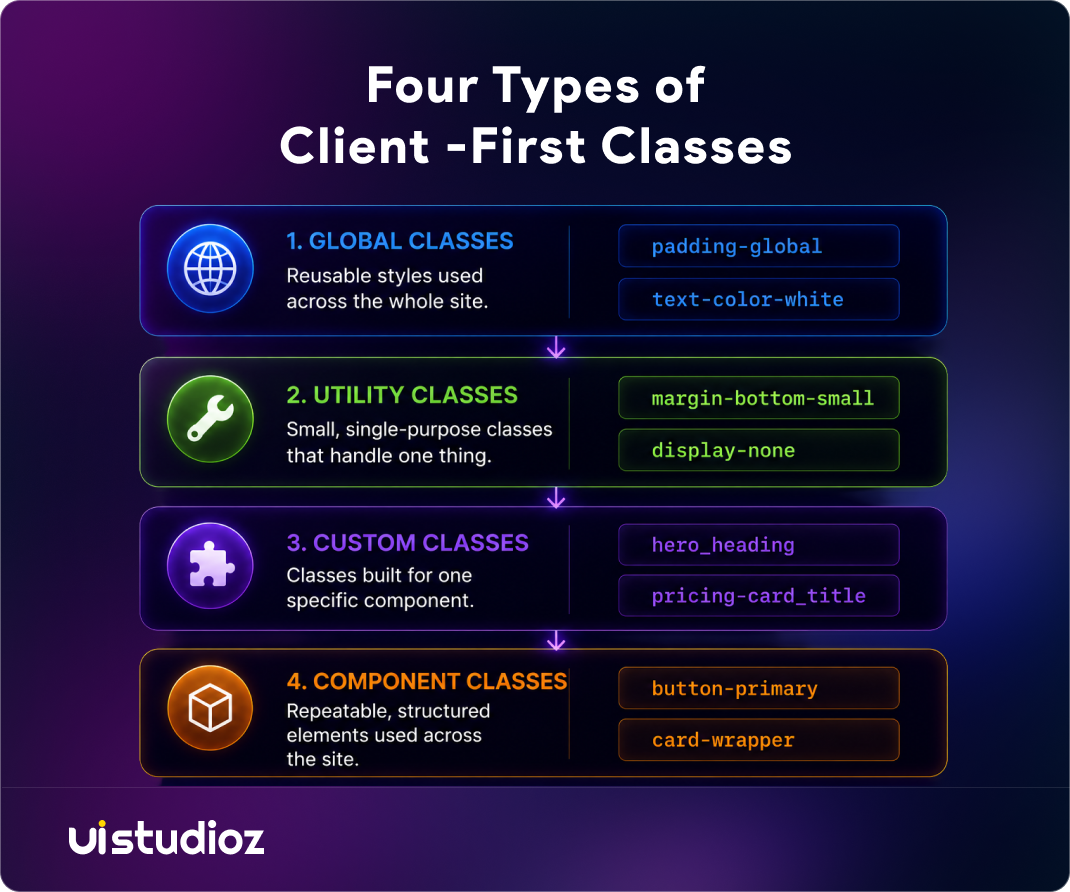
Client-First sorts every class into one of four categories:
- Global classes: reusable styles used across the whole site, such as padding-global or text-color-white
- Utility classes: small, single-purpose classes, such as margin-bottom-small or display-none
- Custom classes: classes built for one specific component, such as hero_heading or pricing-card_title
- Component classes: repeatable, structured elements, such as button-primary or card-wrapper
This structure separates two things: what a class does, and where it belongs. Utility classes handle the “what.” Custom classes handle the “where.” That separation is the core idea behind the framework. It keeps global styling consistent while still letting each component carry its own design.
A hyphen marks a utility class. An underscore marks a custom class. A developer can tell what a class does just by reading its name, without opening the Style panel.
A quick example. Take a simple call-to-action button. It uses a global utility class for its base look (button-primary), a custom class for its specific placement (hero_cta-button), and inherits spacing from a utility class (margin-top-medium). Three classes, three clear jobs, no guessing which one to edit later.
Client-First also works well with Webflow Variables. Variables let a team manage colors, typography, spacing, and other reusable design tokens from one central location, instead of updating the same value on every page by hand.
How a Client-First Page Is Structured
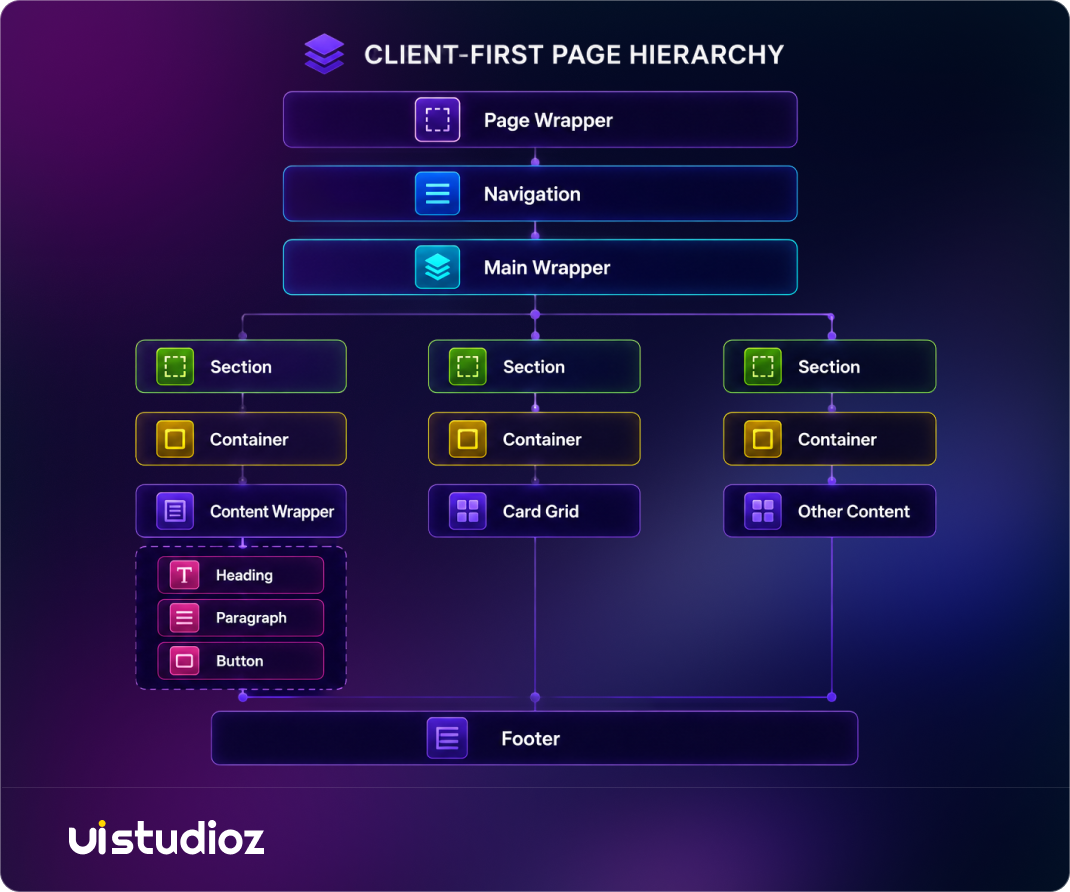
Understanding the naming conventions is only part of using Client-First effectively. The real value comes from organizing every page with a consistent structure that any designer or developer can understand at a glance. Instead of creating random sections and custom classes, Client-First follows a predictable hierarchy where each layer has a specific purpose. This makes projects easier to build, maintain, and
hand off as they grow.
How This Structure Helps
Each level of the hierarchy has a clear responsibility. The page wrapper contains the entire page, while the main wrapper holds the primary content between the navigation and footer. Every content block lives inside a section, which contains a container to maintain consistent widths across the website. Inside the container, developers add components such as headings, cards, forms, or buttons, then apply utility classes for spacing and typography. Because every page follows the same pattern, teams can quickly locate elements, reuse components, and maintain a consistent layout throughout the project.
Core Principles Behind Client-First
Four principles guide every decision inside the framework.
Consistent naming. Every class follows the same pattern, project after project, so nothing needs re-learning.
Reusability. Utility classes get reused across pages instead of creating a new class for the same style.
Separation of structure and style. Layout classes handle positioning. Style classes handle appearance. They rarely mix.
Predictability. Once a developer learns the system, they can open any new Client-First project, even one they have never seen, and understand it in minutes.
These principles are why Client-First functions as a shared Webflow development standard for agencies managing multiple projects at once. Teams that follow structured Webflow design processes treat Client-First as a default choice, not an extra step.
Key Features of Webflow Client-First
Webflow Client-First includes a set of features that make Webflow projects more organized, scalable, and easier to manage. Instead of focusing on the results, these features define how the framework structures classes, layouts, and reusable components for consistent development across every project.
Organized Class Naming
Uses clear, descriptive class names that make Webflow projects easier to understand, navigate, and maintain throughout the development process.
Reusable Utility Classes
Provides reusable utility classes for spacing, typography, layout, and alignment, reducing duplicate styles and keeping the design system consistent.
Global Style Management
Centralizes colours, typography, spacing, and other shared styles, making it easier to maintain design consistency across the entire website.
Structured Page Hierarchy
Defines a predictable page structure using wrappers, sections, containers, and components, making projects easier to organize as they grow.
Reusable Components
Encourages reusable components such as buttons, cards, forms, navigation, and other UI elements, helping teams build faster while maintaining consistency.
Scalable Project Architecture
Creates a standardized project architecture that supports larger websites, CMS-driven projects, and long-term maintenance without creating unnecessary complexity.
Benefits of Using Client-First in Webflow
Client-First delivers long-term advantages beyond keeping a Webflow project organized. By following a standardized development system, teams can build faster, maintain projects more efficiently, and collaborate with greater confidence as websites grow.
Faster Development
Developers spend less time creating duplicate styles or rebuilding common UI elements, allowing projects to move from design to launch more quickly.
Easier maintenance
Predictable naming makes ongoing Webflow maintenance faster, since updates don’t require guessing which class controls what.
Seamless Team Collaboration
Designers, developers, marketers, and future team members can understand the project structure without relying on extensive documentation or handovers.
Smoother Project Handoffs
Whether a project moves to another developer, agency, or in-house team, the standardized naming system reduces confusion and speeds up onboarding.
Better Scalability
As websites grow with new pages, CMS collections, or additional features, the project remains organized and easier to manage without becoming difficult to navigate.
Reduced Styling Errors
The separation of utility classes and custom classes minimizes accidental style overrides and helps maintain a consistent design throughout the website.
Client-First does not directly improve Google rankings. However, a well-structured project is easier to maintain, reduces development errors, and supports better Core Web Vitals optimization over time, which can contribute indirectly to overall SEO performance.
Client-First Naming Convention Explained
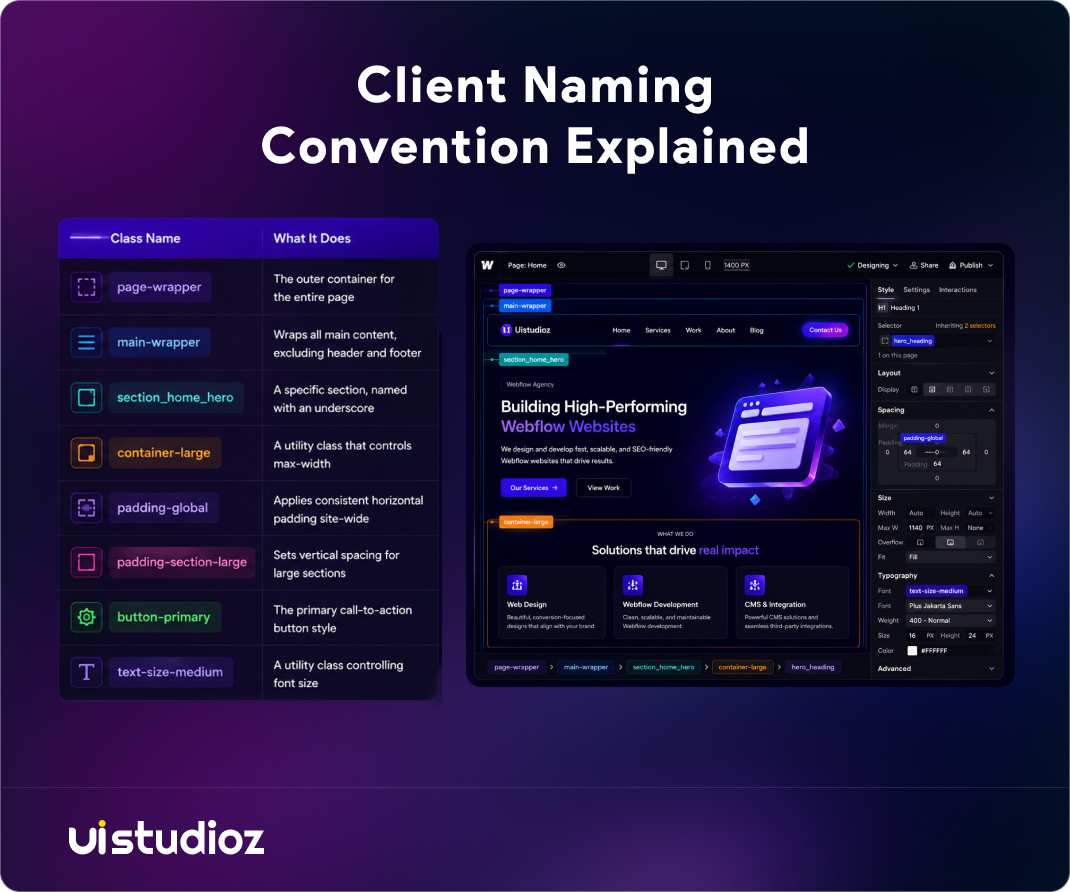
Client-First follows a simple and predictable naming convention that makes every class easy to understand. Below are some of the most commonly used class names and what each one represents.
| Class Name | What It Does |
| page-wrapper | The outer container for the entire page |
| main-wrapper | Wraps all main content, excluding header and footer |
| section_home_hero | A specific section, named with an underscore |
| container-large | A utility class that controls max-width |
| padding-global | Applies consistent horizontal padding site-wide |
| padding-section-large | Sets vertical spacing for large sections |
| button-primary | The primary call-to-action button style |
| text-size-medium | A utility class controlling font size |
Client-First Folder and Project Structure
Client-First also standardizes Webflow CSS organization inside the Navigator, not just how classes are named. Teams typically organize:
- Components: reusable sections such as headers, footers, and cards
- Symbols: repeated elements used across multiple pages
- Variables: shared values such as colors and spacing units
- Assets: images, icons, and other media, named and organized the same way as classes
- Libraries: shared component sets teams reuse across multiple projects
- CMS Collections: structured content, named with the same conventions as the rest of the project
- Utility pages: style guides and 404 pages, kept separate from live content
- Global components: navigation and footer, built once and reused everywhere
This structure matters most during a Figma to Webflow handoff, where a design file needs to become an organized, buildable project instead of a flat list of unlabeled sections.
How to Start Using Client-First
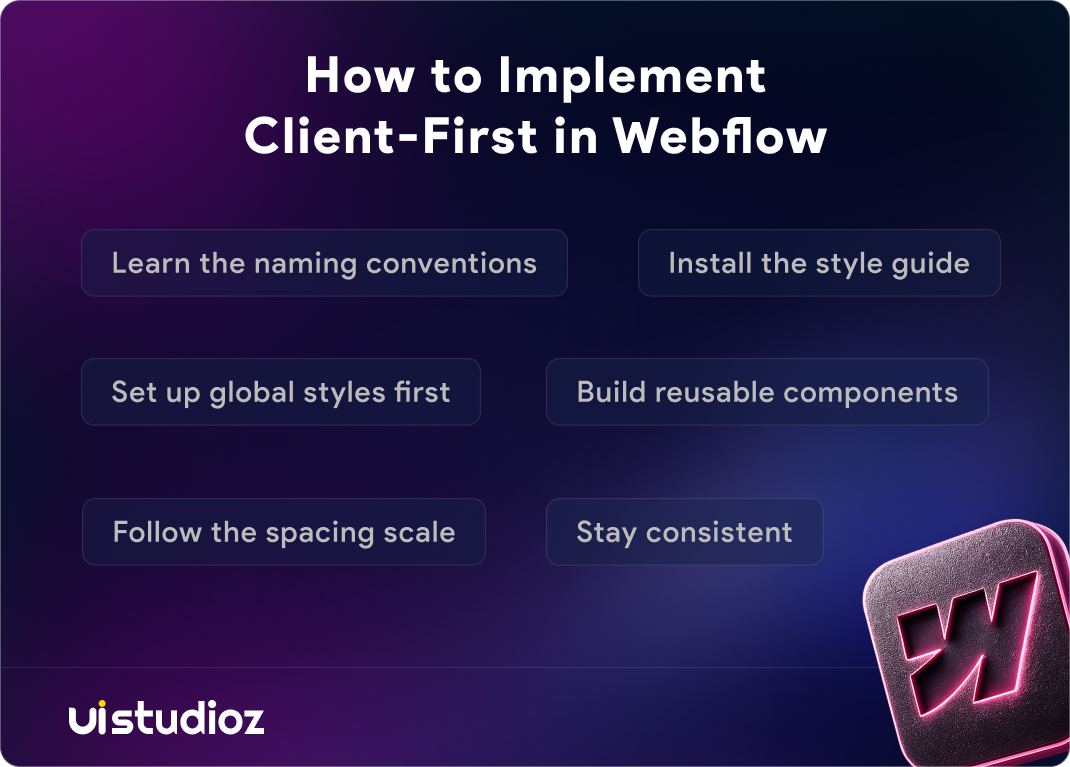
Adopting Client-First does not require rebuilding an existing site. Follow these steps:
- Learn the naming conventions. Study the hyphen-versus-underscore rule before writing a single class.
- Install the style guide. Finsweet provides a free cloneable starter with the system pre-built.
- Set up global styles first. Define padding, typography, and color variables before building any page.
- Build reusable components. Create buttons, cards, and sections once, then reuse them everywhere.
- Follow the spacing scale. Use the predefined spacing values instead of custom pixel amounts.
- Stay consistent. Apply the same naming logic to every new page, even months into the project.
Teams that skip step one, learning the conventions before building, tend to produce the most inconsistent projects later.
Common Mistakes Beginners Make
Even experienced developers slip into these habits:
- Creating unnecessary classes instead of reusing an existing utility class
- Ignoring utility classes and building a custom class for something that already has a global one
- Breaking naming conventions halfway through a project once deadlines get tight
- Overriding styles directly on an element instead of updating the source class
- Mixing systems: combining Client-First with a personal naming habit, which defeats the purpose
Each of these mistakes reintroduces the exact problem Client-First was built to solve.
Client-First vs Traditional Webflow Development
| Client-First | Traditional Naming |
| Organized, predictable classes | Random, developer-specific names |
| Reusable utility classes | Duplicate styles across pages |
| Easy team collaboration | Difficult handoffs between developers |
| Scales with the project | Gets harder to manage as pages grow |
| Faster updates | More manual work per change |
The difference shows up most clearly once a project passes 15-20 pages, or once more than one developer works on it.
Who Should Use Client-First?
Whether you already run Client First Webflow projects or are starting fresh, this system fits any team that expects a project to grow or change hands.
- Agencies delivering Webflow development projects to multiple clients
- Freelancers who want their work to stay usable if a client later hires someone else
- SaaS companies and startups that update their marketing site frequently
- In-house marketing teams editing content without a developer present
Agencies offering white-label Webflow development depend on it too, since a second team often takes over a project without ever speaking to the original builder.
Webflow Best Practices for Using Client-First
These Webflow best practices keep a Client-First project clean as it grows:
- Keep naming consistent across every page, not just the homepage
- Reach for a utility class before creating a custom one
- Reuse components instead of rebuilding similar sections from scratch
- Check whether a class already exists before adding a new one
- Document any project-specific naming decisions for future developers
- Follow the predefined spacing scale instead of arbitrary pixel values
Is Client-First still relevant in 2026? Yes. It remains one of the most widely adopted Webflow frameworks, though alternatives such as Lumos have gained ground with teams that want more built-in functionality.
Conclusion
Client-First is not the only Webflow framework available, but it is the most widely adopted one. It replaces guesswork with a shared system that any developer can read.
For teams that plan to grow, hand off projects, or bring in outside developers, adopting Client-First early avoids a costly rebuild later.
At UIstudioz, every project we build follows this exact naming and structure system. Contact us if you want a Webflow site built the right way from day one.

Frequently Asked Questions
What is Webflow Client-First?
Webflow Client-First is a free class-naming and project-structure system created by Finsweet. It standardizes how Webflow projects are named and organized.
Who created Client-First?
Finsweet created and maintains Client-First, including its documentation, starter cloneable, and certification program.
Is Client-First suitable for beginners?
Yes. The naming rules are simple enough to learn in a day, though mastering the full system takes longer.
Can I migrate an existing Webflow project to Client-First?
Yes, though it usually means renaming classes page by page. A Webflow migration is often the simplest way to move a large or outdated project onto the system without breaking existing pages.
What is the difference between Client-First and custom naming?
Custom naming depends on one developer’s personal habits. Client-First applies the same rules across every developer and every project.