Choosing between Webflow vs Framer is one of the biggest decisions SaaS founders and marketing teams face when building a modern marketing website. Both platforms promise fast development, visual design workflows, and no-code flexibility — but the right choice depends on where your business is today and where it’s headed next.
For an early-stage startup, speed to launch may be the priority. For a growing SaaS company, factors like SEO, content scalability, integrations, and team collaboration become far more important. Choosing the wrong platform can lead to technical limitations, slower marketing execution, and an expensive migration later.
Webflow and Framer are two of the most popular no-code website builders for SaaS startups available today.According to research by Almcorp, organic search drives approximately 53% of total SaaS website visits — making your website platform choice a direct SEO decision, not just a design one. According to W3Techs, Webflow is widely adopted across modern business websites and continues to grow as a platform for content-driven and marketing-focused teams. Framer has also gained significant traction thanks to its design-first approach and rapid publishing workflow.
In this guide, we’ll compare Webflow vs Framer across SEO, CMS, pricing, integrations, scalability, and team workflows to help you choose the right platform for your SaaS website.
What Is Webflow?
Webflow is a visual website development platform that lets you design, build, and launch professional websites without traditional coding. You get a drag-and-drop canvas to design visually, a built-in CMS to manage content, reliable hosting, and SEO controls — all in one place.
Launched in 2013, Webflow now powers hundreds of thousands of websites worldwide and is trusted by many fast-growing SaaS companies. It’s a popular choice for agencies, SaaS marketing teams, and businesses that need a website built to scale.
At Uistudioz, we specialize in custom Webflow development for SaaS companies and enterprises — so we work with Webflow’s strengths and limitations every day.
What Is Framer?
Framer is a no-code website builder that helps designers and businesses create, publish, and manage modern websites using a visual editor. Its canvas closely mirrors Figma, making it easy for designers to go from mockup to live site without a developer handoff.
Framer started as a prototyping tool for designers and later evolved into a full website-building platform. It is known for its fast workflow, smooth built-in animations, and design flexibility.
In recent years, Framer has expanded its CMS capabilities, added AI-powered features, and improved its publishing workflow.
Where Framer wins: speed, design freedom, and visual polish. Where it shows limits: content-heavy sites, technical SEO at scale, and deep third-party integrations.
Webflow vs Framer: Quick Comparison Table
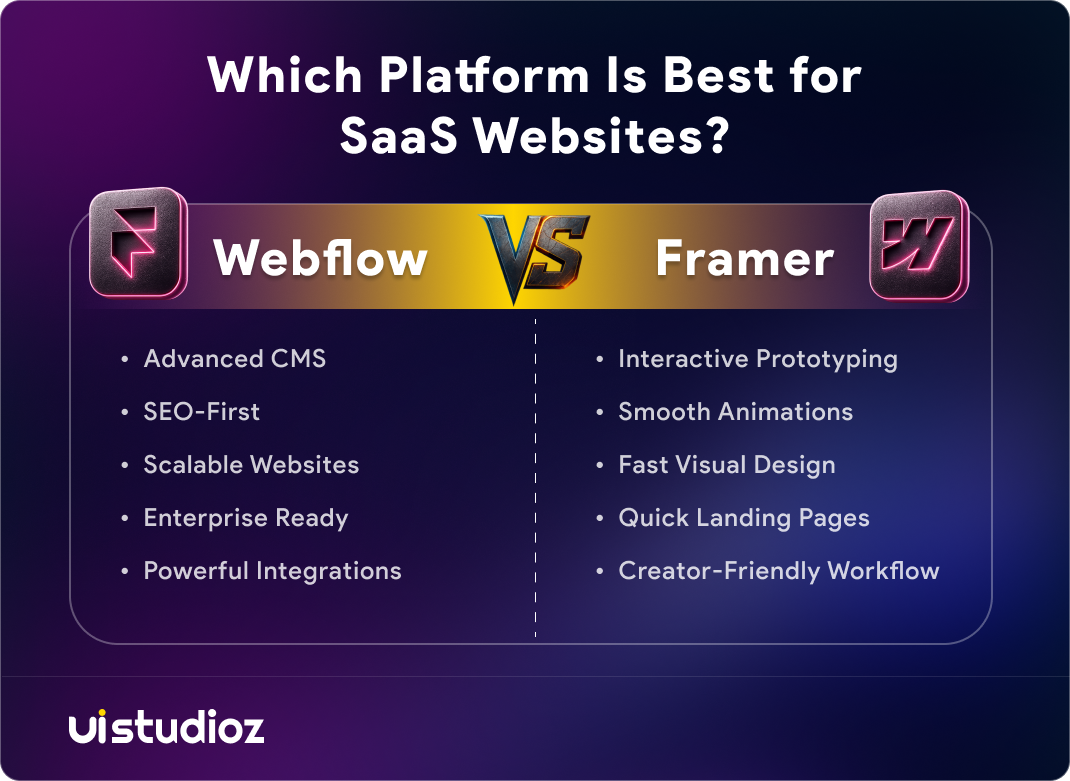
| Feature | Webflow | Framer |
| Best for | SaaS, agencies, content-heavy sites | Landing pages, portfolios, MVPs |
| CMS | Up to 10,000 items, 40 collections | 10 collections max (personal plans) |
| SEO | Full technical SEO + native AEO tools | Basic — covers fundamentals only |
| Pricing | From $14/month (site plan) | From $5/month |
| Learning curve | Steeper — structured like HTML/CSS | Easier — feels like Figma |
| Animations | GSAP-powered, high precision | Smooth, native, beginner-friendly |
| Integrations | 270+ native + thousands via Zapier | No native integrations — Zapier only |
| E-commerce | Native support | Requires third-party tools |
| Code export | Yes — clean HTML/CSS/JS | No |
| Enterprise compliance | SOC 2 Type II, SSO, SCIM | Basic security only |
Why SaaS Websites Need the Right Platform
A SaaS website isn’t just a digital brochure. It’s your primary sales and marketing engine — handling blog content for organic traffic, case studies for social proof, pricing pages that update without a developer, and CRM integrations that connect to your sales stack.
Choosing the wrong platform early means either hitting a ceiling fast or spending weeks migrating later. For a full breakdown of what a complete Webflow for SaaS marketing website setup requires — from page structure to CMS architecture — we’ve covered it in detail on our SaaS service page.
The Webflow vs Framer decision for SaaS startups comes down to one question: are you building for the next 3 months, or the next 3 years?
Webflow vs Framer CMS
The CMS is where the gap between these two platforms becomes most visible.
When comparing Webflow CMS vs Framer Collections, the difference is significant. Webflow CMS supports up to 10,000 items, 40 collection types, nested references, multi-reference fields, and complex filtering. You can manage blogs, case studies, integration pages, changelog entries, and team bios — all with automated SEO metadata per collection template.
Framer CMS handles simple content well. But it limits collections to 10 per personal plan, lacks true nested collection lists, and doesn’t have Webflow’s inherited class system. Changing a button style can mean editing each instance individually across the site.
For Webflow vs Framer CMS for content-heavy sites, the verdict is clear: if you’re planning to publish consistently and scale past 30–50 pages of dynamic content, Webflow gives you the infrastructure to do it without hitting walls.
Webflow vs Framer SEO
SEO is the most important differentiator for SaaS companies with organic growth goals.
Webflow SEO gives you full control: custom meta titles and descriptions per CMS template, schema markup, automated sitemaps, 301 redirects, canonical tags, and clean semantic HTML. In 2025, Webflow launched native AEO (Answer Engine Optimization) audits — built directly into the platform — which helps SaaS sites appear in AI-generated search results from Google AI Overviews, Perplexity, and ChatGPT.
Framer SEO covers fundamentals — metadata, sitemaps, redirects, and canonicals. But dynamic meta fields are less flexible, schema automation requires manual custom code, and there are no native AEO tools. Framer’s output includes more inline styles, which adds page weight and can slow Googlebot’s crawl on large sites.
Is Webflow better than Framer for SEO? For landing pages, both can rank. But if organic search is a primary acquisition channel, Webflow’s structural depth is the stronger long-term foundation. OurWebflow SEO services are built around the technical advantages Webflow provides at scale.
Webflow vs Framer Pricing for SaaS Teams
Webflow site plans start at $14/month (Basic), $23/month (CMS), and $39/month (Business), billed annually. Workspace plans add cost for teams, and add-ons like Optimize and Localize stack on top. See Uistudioz pricing to understand what plan fits your SaaS project.
Framer plans start at $5/month, with the Pro plan at $30/month and Scale at $100/month annually. Seats and most features are bundled per tier, making it simpler to budget for small teams.
The real cost difference shows at scale. Framer has no native integrations — connecting your CRM, email platform, or analytics tools requires Zapier or Make, adding $20–$150/month in middleware. For a B2B SaaS team with a full marketing stack, Webflow’s 270+ native integrations can reduce total operational cost over 12–24 months.
Is Framer cheaper than Webflow? For a simple 5-page site, yes. For a SaaS site with a blog, CRM, and analytics stack — when you account for middleware — the gap closes fast.
Webflow vs Framer for Landing Pages and Design Flexibility
Framer is a capable SaaS landing page builder built for design-first, visually rich experiences. Its canvas mirrors Figma, so designers ship landing pages fast without handing off to developers. Native animations — scroll effects, hover states, micro-interactions — are built in. For product launches, campaign microsites, or MVP validation pages, Framer’s speed and visual output are hard to beat.
Webflow provides more structural control. Animations run on GSAP, giving them more precision at scale. Webflow’s class inheritance and reusable component system keeps consistency across dozens of pages — something Framer can’t match at scale.
For Framer for SaaS landing pages (single campaign pages, short-lived microsites): Framer wins on speed. For Webflow vs Framer for startup landing pages that need to grow into a full marketing site: Webflow is the safer long-term investment. OurWebflow design team builds conversion-focused SaaS sites that scale with the product. Pair that with Webflow CRO services and your landing pages do more than just look good — they convert.
Framer vs Webflow Learning Curve and Team Collaboration
The Framer vs Webflow learning curve for beginners is one of the most common points of comparison. Framer’s learning curve is shorter. If you’ve used Figma, you’ll feel at home immediately. Non-technical founders and designers can ship a polished site in hours. Real-time collaboration is multiplayer-native — everyone works in the same canvas simultaneously.
Webflow’s learning curve is steeper because it mirrors how HTML and CSS actually work. This takes more time upfront but produces a more stable, maintainable site long-term. Webflow separates the Designer (for devs and designers) from the Editor (for content teams) — a major advantage for SaaS companies with multiple people editing the site.
The Framer vs Webflow client handoff differs too. Framer offers free client editing on Pro Expert plans. Webflow requires clients to have a paid Workspace — but delivers a more controlled editing environment that prevents layout breaks.
For agencies delivering white-label Webflow development, the Designer/Editor separation is the reason clients can update content daily without risk. Use Framer for solo designers building quick visual sites. Use Webflow for teams that need structure and role-based editing. If your design workflow starts in Figma, our Figma to Webflow service makes the transition seamless without rebuilding from scratch.
Webflow vs Framer Integrations and Custom Code
Webflow integrations include over 270 native connections — HubSpot, Salesforce, Mailchimp, Intercom, Google Analytics 4, Hotjar, and more — without custom middleware. Webflow also generates exportable HTML/CSS/JS that developers can inspect, extend, and self-host. Our Webflow integration services cover everything from CRM connections to custom automation workflows.
Framer integrations work through Zapier, Make, or custom code only — no native library. Its design output is locked inside a React black box, which limits what developers can build on top. For Webflow vs Framer custom code: Webflow wins on both flexibility and portability.
Can Framer Replace Webflow for SaaS Websites?
For early-stage SaaS teams validating a product with a 5–10 page site, Framer is a legitimate choice. It’s faster to launch and cheaper to start.
But can Framer replace Webflow for SaaS websites at growth stage? Not yet. Once you add a blog with 30+ posts, case studies, multi-team editing, HubSpot integration, and AEO optimization — Framer’s ceiling shows clearly. The CMS can’t handle the content architecture, the SEO tooling isn’t deep enough, and the integration gaps create real operational overhead.
Many SaaS teams follow the same path: launch on Framer pre-PMF, then migrate to Webflow once content and integrations start mattering. That’s valid — but it means doing migration work when you’re already busy scaling.
Should You Migrate From Framer to Webflow?
Consider migrating if you’re experiencing any of the following:
- Your blog is growing and Framer’s CMS is hitting structural limits
- Your SEO isn’t scaling — pages lack the technical structure to compete
- Your marketing team needs to edit content without risking layout breaks
- Your integration stack requires native connections Framer can’t provide
- You’re planning localization, enterprise security compliance, or AEO strategy
Migration Scenario Guide
| Scenario | Recommended Platform |
| MVP SaaS Startup | Framer |
| SaaS with Active Blog | Webflow |
| Enterprise SaaS | Webflow |
| Portfolio Website | Framer |
| Content Marketing Strategy | Webflow |
| Localization Requirements | Webflow |
| Campaign Microsite | Framer |
A Framer to Webflow migration is a manual rebuild — no one-click export. Most migrations take 2–5 weeks depending on content volume and complexity. Our Webflow migration services handle everything from design rebuild to 301 redirects and SEO preservation, so your rankings stay intact through the move.
When to Choose Webflow vs Framer for SaaS
When Should You Choose Webflow?
Choose Webflow if you:
- Need a scalable CMS to support a growing blog and content library
- Rely on SEO as a primary lead generation channel
- Have multiple team members managing and editing content
- Need enterprise-grade security and integrations (SOC 2 Type II, SSO, HubSpot, Salesforce)
- Are planning localization, AEO strategy, or long-term content marketing
When Should You Choose Framer?
Choose Framer if you:
- Need a fast MVP launch with minimal setup
- Want a designer-first, Figma-like workflow
- Are building a simple marketing site or portfolio under 10 pages
- Don’t yet require advanced CMS functionality or deep integrations
- Are validating a product before committing to a full marketing stack
Webflow vs Framer Pros and Cons
Webflow Pros
- Enterprise-grade CMS — handles thousands of content items
- Full technical SEO and native AEO tools
- Clean, exportable HTML/CSS/JS output
- 270+ native integrations — no middleware for most tools
- Designer/Editor separation — safe for non-technical teams
- SOC 2 Type II, SSO, SCIM — enterprise security compliance
Webflow Cons
- Steeper learning curve — takes weeks to master
- Higher total cost for large teams with workspace seats and add-ons
- Slower to spin up for simple landing pages
- Requires ongoing Webflow maintenance to keep performance and security in top shape — though this applies to any serious business website
Framer Pros
- Fast to launch — polished site in hours
- Figma-like canvas — intuitive for designers
- Beautiful native animations
- Lower starting price
- Strong for MVPs, portfolios, and campaign pages
Framer Cons
- CMS limited — 10 collections max, no nested lists
- No native integrations — middleware adds cost
- No code export
- SEO tooling doesn’t scale for content-heavy sites
- No enterprise security certifications
Final Verdict: Which Platform Is Better for SaaS Websites?
Early-stage SaaS (pre-seed, MVP, under 10 pages): Framer is a solid starting point. You ship fast, spend less, and iterate on messaging quickly.
Growth-stage SaaS (active blog, integrations, team editing): Webflow is the stronger platform. It handles content scale, SEO depth, integration complexity, and team workflows that a real SaaS marketing site requires.
Enterprise SaaS (compliance, localization, AEO strategy): Webflow is the only real option. SOC 2 Type II, SSO, native AEO audits, and unlimited CMS items make it enterprise-ready in a way Framer isn’t.
Webflow vs Framer for SaaS marketing websites — the honest answer: Framer to start fast, Webflow to scale properly. If you’re already past validation and building for growth, start with Webflow and skip the migration cost later.
Conclusion
Webflow vs Framer isn’t just a platform comparison — it’s a question of where your SaaS business is today and where it’s headed next. Framer wins on speed and design simplicity. Webflow wins on depth, SEO performance, and long-term scalability. For SaaS companies serious about organic growth, content marketing, and a website that grows with the product, Webflow is the right platform.
If you’re ready to build a high-performance Webflow SaaS website — or migrate from Framer without SEO risk — contact the Uistudioz team. We’ve built and migrated Webflow SaaS sites for companies across 15+ countries and we’ll help you make the right decision for your stage.

Frequently Asked Questions
Which is better for SaaS startups, Webflow or Framer?
Both platforms can work for SaaS startups. Framer is great for launching quickly, while Webflow is often a better choice for startups planning to scale their content, SEO, and marketing efforts over time.
Can Webflow handle large SaaS blogs?
Yes. Webflow CMS supports up to 10,000 items and 40 collection types, making it well-suited for large SaaS blogs with hundreds of posts, case studies, changelog entries, and integration pages — all with automated SEO metadata per template.