

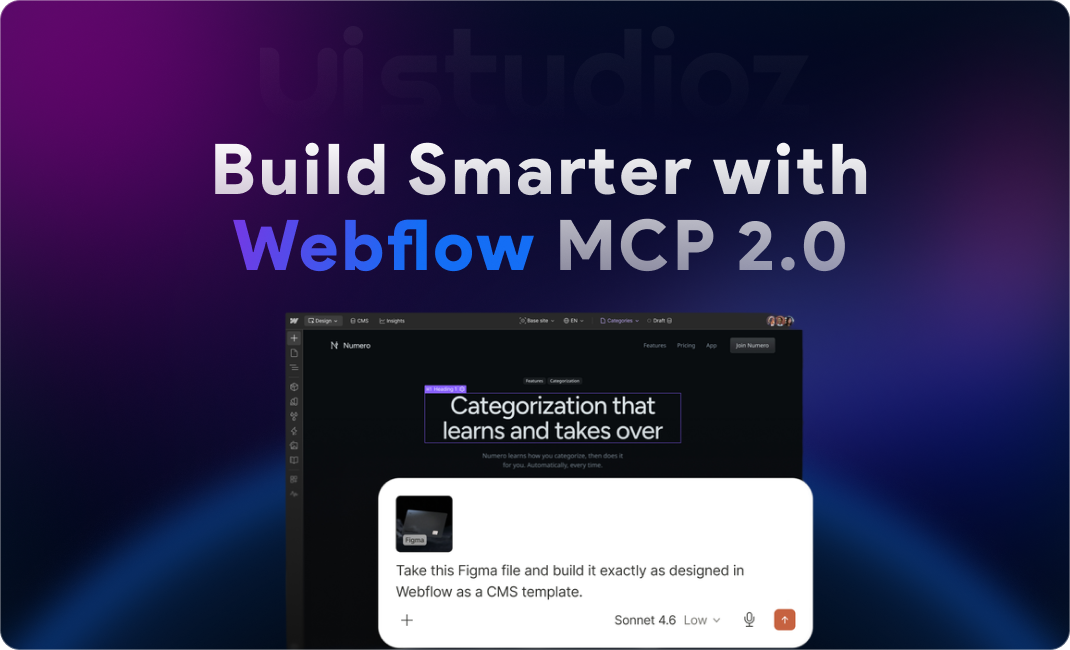
Webflow launched MCP 2.0 on July 21, 2026. The update changes how AI agents work inside live Webflow sites. According to Webflow’s official MCP 2.0 launch announcement, over 30% of enterprise customers already use MCP, and usage has grown four times since January 2026. Nearly 90% of those users connect through Claude.
This growth signals a shift in how websites get built. AI tools no longer just suggest code. They edit real pages, real components, and real CMS content, and those edits go live the moment they publish. Webflow MCP 2.0 exists to make that process safe, structured, and on-brand.
This guide breaks down what Webflow MCP 2.0 is, how it works, and what it means for designers, developers, and marketing teams. You will also find a feature-by-feature comparison with older Webflow workflows, real use cases, and answers to the most common questions teams ask before adopting it.
Webflow MCP 2.0 at a Glance
- Released: July 21, 2026
- Purpose: Enable AI agents to design, build, and manage Webflow sites directly
- Supports: Claude, ChatGPT, Cursor, Windsurf, and other MCP-compatible clients
- Key Feature: Full Designer Access
- Biggest Improvement: Headless Designer — most actions no longer require an open Designer session
- Cost: Free, on every Webflow site plan
- Best For: Agencies, SaaS companies, startups, and enterprise teams
What Is Webflow MCP 2.0?
MCP stands for Model Context Protocol. It is an open standard that lets AI tools like Claude, ChatGPT, and Cursor connect directly to external platforms and act inside them. Webflow MCP is Webflow’s own implementation of that protocol.
Webflow MCP 2.0 is a major upgrade over the original release. The first version relied on a bridge app and an active Designer session to make most edits. Webflow MCP 2.0 removes that requirement for most actions. Agents can now query and edit elements, styles, components, and variables without opening the Designer at all.
The difference between traditional workflows and AI-powered workflows comes down to speed and context. A traditional workflow means a designer opens Webflow, clicks through panels, and manually updates each page. An AI-powered workflow means a person describes the change in plain language, and the agent executes it directly inside the live design system.
Why Did Webflow Launch MCP 2.0?
Demand for AI-assisted website development grew fast through 2026. Marketing and product teams wanted agents that could build and update pages without waiting on a developer for every small change.
Browser automation created real problems for that demand. Agents driving a browser had to click through the same UI a human would, which made them slow and prone to breaking when the interface changed. Webflow MCP 2.0 solves this with a headless approach that talks to Webflow’s APIs directly instead of simulating clicks.
Webflow also needed a way to keep AI-driven changes reliable at scale. Linda Tong, Webflow’s CEO, has pointed out that agent edits go live the instant they publish, in front of customers, competitors, and every crawler on the web. That level of exposure is why Webflow MCP 2.0 was built around governance from day one, not added as an afterthought.
Better collaboration was the third driver. Designers, developers, and AI agents now need to work inside the same design system without stepping on each other’s changes. Webflow MCP 2.0 gives every one of them shared context and shared rules.
Key Features of Webflow MCP 2.0
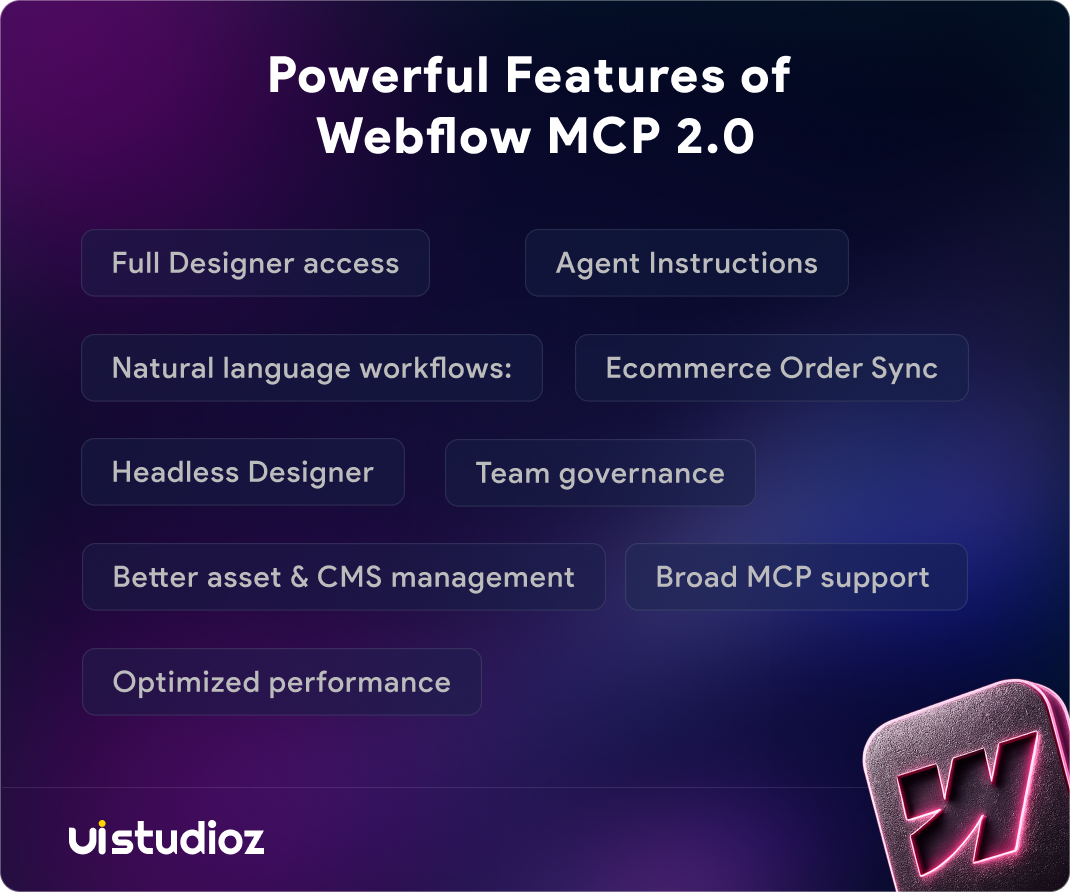
At a glance, Webflow MCP 2.0 covers eight core capabilities:
- Full Designer access: AI can edit pages, components, styles, variables, and CMS content.
- Agent Instructions: Set persistent brand, design, accessibility, and content rules for AI.
- Natural language workflows: Build, edit, and manage Webflow sites with simple prompts.
- Headless Designer: Faster, more reliable AI actions without browser automation.
- Team governance: Role-based permissions, branching, and review workflows for safe collaboration.
- Better asset & CMS management: Improved handling of uploads, content, and data.
- Optimized performance: Lower token usage and more context-aware AI interactions.
- Broad MCP support: Works with ChatGPT, Claude, Cursor, Windsurf, and other MCP-compatible clients.
Each of these is explained below.
Full Designer Access
Webflow MCP 2.0 gives agents full access to the Webflow Designer API. Agents can edit pages, components, styles, variables, and CMS collections directly. This includes managing component props, slots, and variants, along with per-style variable modes.
Earlier versions limited agents to a narrower set of actions inside an active session. Full Designer access means an agent can now touch nearly everything a human designer could touch inside the platform.
Agent Instructions
Agent Instructions let a team store persistent rules that every connected AI tool must follow. These cover design rules, brand guidelines, accessibility requirements, and content standards.
Once a team sets these rules, agents apply them automatically inside Webflow or through Claude and Cursor. This is what keeps AI-generated pages consistent with a brand’s voice and visual system, instead of producing generic output that needs a full rebuild.
Natural Language Workflows
Webflow MCP 2.0 supports natural language workflows for building pages, editing layouts, updating content, and managing entire websites. A marketer can type a request in plain English and the agent carries out the task inside the live site.
This removes the need to learn Webflow’s interface before making meaningful changes. It also speeds up routine work like updating CMS entries or adjusting page copy across multiple pages at once.
Headless Designer
The Headless Designer is one of the biggest changes in Webflow MCP 2.0. Most element, component, style, and variable operations no longer need an open Designer session or the old bridge app.
Removing browser automation makes agent actions faster and more reliable. Teams can now build across multiple pages or sites at the same time, something the bridge-app model could not support well.
Team Governance
Webflow MCP 2.0 enforces a workspace’s existing roles and permissions across every agent action. Teams get page branching for safe iteration, plus detailed audit logs that show exactly which changes came from an AI agent.
This governance layer matters most for agencies and larger teams managing production sites for clients. It gives a lead the ability to review AI-made changes before they go live, instead of discovering them after publish.
Better CMS & Asset Management
Agents can now upload assets, organize media, and update Webflow CMS collections with far less manual setup. Webflow CMS AI capabilities extend to generating sample content, populating new fields, and connecting reference fields between collections.
Content teams benefit the most here. Bulk CMS updates that once took hours of manual entry can now run through a single conversational request.
Optimized AI Performance
Webflow MCP 2.0 was built to reduce token usage while improving context awareness. Agents get more relevant data per request, which means faster responses and lower cost per action for teams running frequent AI workflows.
Broad MCP Support
Webflow MCP 2.0 works with any MCP-compatible client, including Claude, ChatGPT, Cursor, and Windsurf. Nearly 90% of current MCP users connect through Claude, which reflects how deeply Anthropic’s tools are already integrated into Webflow’s agentic workflows.
How Webflow MCP 2.0 Works
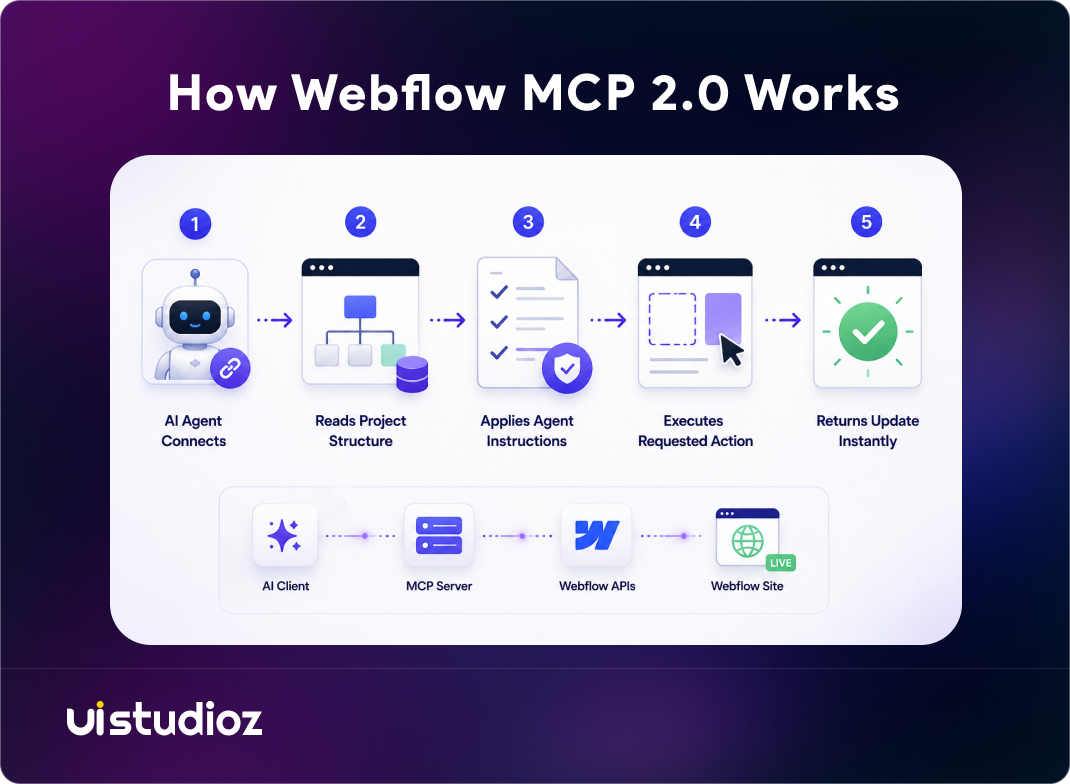
The process follows a consistent pattern regardless of which AI client a team uses.
- The AI agent connects to a Webflow site through the MCP server.
- It reads the project’s structure, including pages, components, styles, and CMS data.
- It applies the site’s Agent Instructions to understand brand and design context.
- It executes the requested action, such as editing a component or updating a collection.
- It returns the update instantly, respecting the workspace’s roles and permissions.
Because most of this happens without a Designer session, updates apply directly through Webflow’s APIs. That is the core difference from the original MCP release, and it is what makes Webflow MCP 2.0 workflows noticeably faster.
Benefits of Webflow MCP 2.0
The table below compares a traditional Webflow workflow with an MCP 2.0 workflow.
| Traditional Workflow | MCP 2.0 Workflow |
| Manual page editing | AI edits instantly |
| Browser automation | Headless Designer |
| Manual CMS updates | AI-assisted CMS management |
| Multiple disconnected tools | Unified conversational workflow |
| Higher manual effort | Natural language prompts |
The practical benefit is time. Teams spend less time on repetitive edits and more time on strategy, design direction, and client work. The governance layer also means speed does not come at the cost of brand control.
Real-World Use Cases
For designers, Webflow MCP 2.0 speeds up page creation, component updates, and style management across a design system. A designer can ask an agent to apply a new component variant across every page that uses it. Uistudioz applies this inside its own Webflow design process to keep component libraries clean while agents make changes.
For developers, it reduces repetitive tasks like manual CMS updates and landing page builds. Developers can focus on custom interactions and integrations instead of routine content work. See examples of this kind of build in Uistudioz’s Webflow project portfolio.
For marketing teams, it supports faster blog publishing, campaign page updates, and landing page optimization without waiting on design or dev resources for every change.
For agencies, Webflow MCP 2.0 supports white-label Webflow development with faster project delivery and consistent brand guidelines across multiple client sites. Uistudioz applies this exact workflow inside its own white-label Webflow development process to move client projects through design and build stages faster.
Webflow MCP 2.0 vs Traditional Webflow Development
| Feature | Traditional | MCP 2.0 |
| AI Editing | Not available | Full support |
| Natural Language Workflows | Not available | Full support |
| CMS Management | Manual | AI-assisted |
| Team Governance | Limited | Advanced, with audit logs |
| Browser Automation | Required | Not required |
| Performance | Standard | Optimized for lower token use |
Is Webflow MCP 2.0 Free?
Yes. Webflow MCP 2.0 is available to all users at no additional cost, on every Site plan, including the free Starter plan. There is no separate MCP subscription or add-on fee.
Workspace requirements: You need an active Webflow workspace to authorize the MCP server. The connection follows whatever Site and Workspace plan you already have — MCP itself does not require an upgrade.
Enterprise plans: Enterprise Workspaces get extra governance controls, like SSO and SCIM-based user provisioning, but MCP access itself is not locked behind an Enterprise plan. Any workspace can connect and use it.
Limitations: A few specific actions still require an open Designer session with the Bridge App connected, such as capturing a visual snapshot of an element or reading the current page, selection, or breakpoint. Every other action, including most editing and CMS work, runs without opening the Designer. Each authorization also connects to a single workspace at a time; switching workspaces means reconnecting the MCP server.
Who Should Use Webflow MCP 2.0?
Webflow MCP 2.0 fits a wide range of teams:
- SaaS Companies
- Marketing Teams
- Webflow Agencies
- Freelancers
- AI Startups
- Enterprise Businesses
- Content Teams
SaaS companies in particular benefit from faster iteration on product pages and pricing updates. Uistudioz builds and maintains these workflows through its dedicated Webflow for SaaS services, applying Agent Instructions to keep every page aligned with a product’s brand system.
AI-first companies have a similar need but a different focus: showcasing agentic products clearly while keeping the site itself AI-ready. Uistudioz covers this directly through its Webflow services for AI businesses, built around the same MCP-driven workflows this guide covers.
Requirements Before Using Webflow MCP 2.0
Before connecting an AI agent to a live site, a team needs:
- An active Webflow workspace
- An MCP-compatible AI client, such as Claude, ChatGPT, Cursor, or Windsurf
- Authorization of the MCP server to that specific workspace
- Existing team roles and permissions set up, since MCP enforces them rather than replacing them
- Agent Instructions configured, so agents follow brand, design, and content rules from the first edit
- CMS collections in place, if agents will manage dynamic content
Best Practices for Using Webflow MCP 2.0
- Configure Agent Instructions before letting agents make production edits.
- Maintain reusable components so AI-generated pages stay consistent.
- Set governance permissions based on team roles, not by default access.
- Organize CMS collections clearly so agents reference the right fields.
- Review every AI-generated change before it publishes to a live site.
Common Challenges & Considerations
Teams adopting Webflow MCP 2.0 face a real learning curve, especially around writing effective Agent Instructions. Vague instructions produce inconsistent output, while specific, example-based instructions produce far more reliable results.
Permission management also takes planning. A team needs to decide which roles can approve agent changes versus which roles can only request them. Skipping this step is the most common reason teams see unexpected edits on a live site.
Future of AI-Powered Webflow Development
Webflow’s own data points to where this is heading. MCP usage has already grown four times since January 2026, and enterprise adoption is climbing past 30%. Expect agents to get better at multi-page consistency, deeper CMS automation, and more proactive content suggestions as the protocol matures.
Why Choose Uistudioz for Webflow Development?
Uistudioz is a certified Webflow development partner working with AI-powered workflows like Webflow MCP 2.0 every day. The team handles Figma to Webflow conversion, custom Webflow development, and ongoing Webflow maintenance and support for businesses that want AI-assisted speed without losing design quality.
Uistudioz also runs dedicated Webflow SEO services to make sure every AI-built or AI-updated page stays optimized for search after publish. For a deeper look at setting up Claude specifically inside Webflow, see our earlier guide on Webflow MCP automation workflows.
Conclusion
Webflow MCP 2.0 gives AI agents real, governed access to production Webflow sites. Full Designer access, Agent Instructions, and the Headless Designer remove the friction that slowed down earlier AI-assisted workflows. Team governance keeps every change accountable, even at scale.
Businesses that adopt Webflow MCP 2.0 now gain a real speed advantage over teams still relying on manual, page-by-page updates. If your team wants help setting up Agent Instructions, governance rules, or a full Webflow build around this workflow, contact Uistudioz to get started.

Frequently Asked Questions
What is Webflow MCP 2.0?
Webflow MCP 2.0 is Webflow’s updated Model Context Protocol server. It lets AI agents like Claude edit live Webflow sites with brand governance, team permissions, and audit logging built in.
How does Webflow MCP 2.0 work?
An AI agent connects through the MCP server, reads the site’s structure and Agent Instructions, then executes requested edits directly through Webflow’s APIs without needing a Designer session for most actions.
Which AI tools support Webflow MCP 2.0?
Webflow MCP 2.0 works with Claude, ChatGPT, Cursor, Windsurf, and any other MCP-compatible client.
Is Webflow MCP 2.0 suitable for agencies?
Yes. Agencies use it for white-label Webflow development, since it keeps brand guidelines consistent across multiple client sites while speeding up delivery.
Can Webflow MCP 2.0 manage Webflow CMS content?
Yes. Agents can upload assets, organize media, create and populate CMS fields, and link reference fields between collections.
What is the Headless Designer in Webflow MCP 2.0?
The Headless Designer lets agents edit elements, styles, components, and variables without an open Designer session, which removes the reliability issues that came with browser automation.