
Your CMS choice determines whether your team ships landing pages in hours or waits weeks for developer availability—and that gap compounds for years, not months. Get it wrong, and you either outgrow the platform in twelve months or pay developers for updates a marketer should handle alone.
Webflow vs Contentful is one of the most common CMS debates right now, and the two platforms solve the same problem in opposite ways. Webflow bundles design, content, and hosting into one visual tool, so a marketer can publish without waiting on a developer. Contentful strips content out entirely and delivers it through APIs to whatever frontend a development team builds instead.
At Uistudioz, we’ve helped startups, SaaS companies, and agencies build and migrate Webflow websites while also consulting teams evaluating headless CMS solutions like Contentful. Based on those projects, we’ve seen that the right choice depends far more on workflow than features alone.
Choose Webflow if your marketing team needs to ship pages fast without waiting on developers. Choose Contentful if you’re powering multiple platforms—website, mobile app, and internal tools—from one content source. The rest of this guide helps you confirm which scenario matches yours.
Quick Comparison: Webflow vs Contentful
| Feature | Webflow | Contentful |
| CMS Type | Visual CMS | Headless CMS |
| Best For | Marketing websites | Enterprise platforms |
| Target Users | Designers & marketers | Developers & enterprises |
| Hosting | Built-in | Separate |
| Frontend | Included | Custom development |
| Learning Curve | Easy | Technical |
| Flexibility | Design-focused | Content-focused |
What Is Webflow CMS?
Webflow CMS is a visual-first content system built directly into Webflow’s website builder. You design the page and manage the content in the same workspace, with no separate database to configure and no frontend to build from scratch. Launched in 2013, the platform now powers websites for organizations including Dropbox, PwC, and TED, alongside thousands of small teams and solo founders.
Marketers and designers use it because updates don’t need a developer. A content editor can add a blog post, swap an image, or update a case study directly, and the change goes live the moment they hit publish. This single detail is why fast-moving teams choose Webflow development over a traditional CMS stack that separates the editor from the developer queue.
Key Features of Webflow CMS
- Visual editor — build and rearrange layouts by dragging elements, no code required.
- CMS Collections — structured, reusable content for blogs, case studies, and portfolios.
- Built-in SEO controls — meta titles, automatic sitemaps, redirect management, and clean URLs.
- Managed hosting — SSL, global CDN delivery, and uptime handled by the platform.
- Lower developer dependency — marketing teams publish independently instead of filing tickets.
Webflow’s hosting runs on Amazon Web Services with CDN delivery, and the platform maintains SOC 2 Type II, GDPR, and CCPA compliance out of the box. For context, a typical marketing team using Webflow publishes content changes within the same working day. The same update through a traditional CMS + developer workflow averages 3-7 business days, according to teams we’ve migrated to Webflow.For most small-to-mid-size teams, that removes an entire category of infrastructure decisions before the site even launches.
What Is Contentful CMS?
Contentful is a headless CMS. It stores your content in a structured repository and delivers it through an API to any frontend you connect — a website, a mobile app, or an internal dashboard. There’s no built-in visual editor and no hosting layer included.
This separation is exactly why developers and enterprises choose it. One content model can feed five different platforms without duplicating a single entry, which matters once a brand runs a website, an app, and a partner portal off the same product catalog.
How Does Contentful Work?
A traditional CMS bundles content, design, and website into one platform. Contentful splits that into three separate steps: content goes into Contentful, an API pulls it out, and a separate frontend renders it for whichever surface needs it — website, mobile app, or another digital channel. That frontend is usually built with a framework like Next.js, Gatsby, or Nuxt, paired with hosting on Vercel or Netlify.
Why Enterprises Choose Contentful
Large organizations pick Contentful when they manage multiple brands, multiple languages, or content teams spread across time zones. Structured content governance and reusable content blocks matter more than visual design speed once a company reaches that scale. Headless architectures like this also suit businesses running several digital products off a single content source — think an international brand operating a marketing site, a mobile app, and a partner back-office in parallel.
Key Features of Contentful CMS
- Headless architecture — full frontend freedom, no platform lock-in.
- Structured content modeling — custom content types and reusable content blocks.
- API-based delivery — works with any modern framework a development team chooses.
- Enterprise scalability — built for large content libraries distributed across channels.
Webflow vs Contentful: Architecture Difference
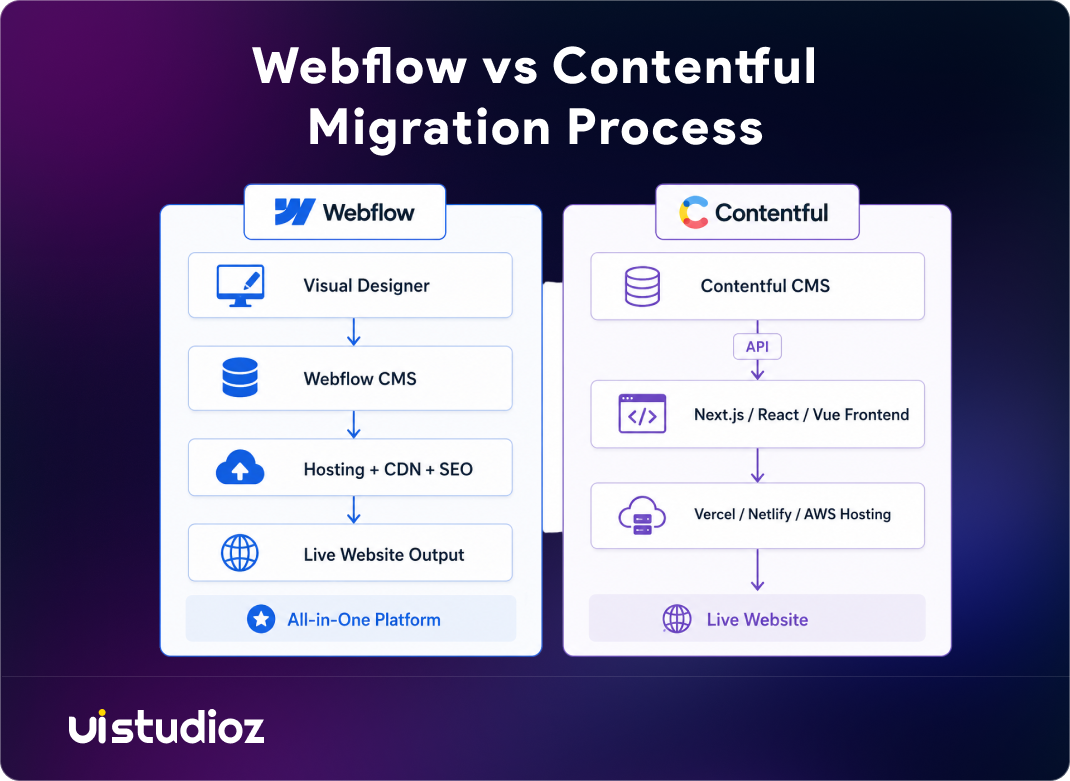
The core webflow vs contentful architecture split comes down to coupling. Webflow keeps content, design, and hosting under one roof, so a designer works inside a managed environment from start to finish. Contentful keeps content in a repository and hands it off through an API layer, leaving design and hosting entirely to a separate frontend team.
This headless CMS vs visual CMS distinction affects daily work more than most teams expect going in. A Webflow site owner edits a live page directly. A Contentful content editor edits a content entry, then waits for the frontend to render it, which depends on how that frontend was built. We broke this down in more depth in our headless CMS vs Webflow CMS comparison, including where each architecture creates bottlenecks for growing teams.
Webflow vs Contentful: Key Differences
| Feature | Webflow | Contentful |
| Website Builder | Yes | No |
| Hosting | Included | Separate |
| SEO | Built-in tools | Developer implementation |
| API Flexibility | Limited | Advanced |
| Collaboration | Marketing focused | Enterprise workflow |
| Scalability | Website focused | Platform focused |
Webflow vs Contentful: Feature Comparison
Ease of Use
Webflow is built for non-coders. You see the page as you edit it, and changes apply instantly across breakpoints. Contentful requires technical setup from day one — someone still has to build and maintain the frontend that displays the content, which means a developer is involved even for a simple content model change.
Design Flexibility
Webflow gives you full visual control inside the platform itself, which is why so many teams choose Webflow design when brand precision matters most. Contentful gives you unlimited design freedom too, but only because you’re building the frontend yourself, entirely outside the CMS. That freedom comes with a real cost: every layout decision now needs engineering time.
Content Management Workflow
Webflow’s workflow is website-focused — content and page layout live together in one editing surface. Contentful’s workflow is channel-agnostic — the same content entry can power a website, an app, and a partner portal at once, without anyone re-entering the same data three times.
Collaboration Features
Both platforms support user roles and approval workflows before content goes live. Webflow’s permissions are built for marketing teams editing a single site together. Contentful’s permissions scale across large teams managing multiple content spaces, locales, and environments, which fits enterprise content governance far better than a single-site workflow.
Security and Compliance
Webflow handles SSL, hosting security, and platform-level compliance for you as part of the subscription. Contentful secures the content layer itself, but your team owns security for whatever frontend and hosting stack you connect to it — one more responsibility that shifts to your developers.
Webflow vs Contentful SEO Comparison
For webflow vs contentful seo, Webflow ships with metadata control, automatic sitemaps, redirect management, and clean URLs out of the box, with no developer required to set any of it up. Our Webflow SEO services build on that foundation for teams that want deeper technical optimization once the basics are covered.
Contentful’s SEO output depends entirely on the frontend implementation connected to it. A well-built Next.js frontend can match or beat Webflow’s SEO performance on paper, but the setup takes real developer time that Webflow skips entirely. If that frontend team doesn’t prioritize metadata and sitemap generation, SEO quietly falls behind while nobody notices until traffic drops.
Webflow vs Contentful Performance Comparison
Webflow performance runs on a global CDN with managed hosting, so a new site gets solid load times without extra configuration on launch day. Contentful’s performance depends entirely on your chosen frontend framework and hosting provider — a well-optimized Next.js and Vercel stack can be very fast, but that speed isn’t automatic the way it is with Webflow’s bundled hosting.
Webflow vs Contentful Pricing Comparison
Webflow bundles hosting, CMS, and design tools into one subscription, which keeps costs predictable for a single marketing site with one team managing it. According to Webflow’s own comparison page, teams that previously relied on a decoupled CMS setup describe page updates that used to take weeks now shipping in a single day once they move to a unified platform.
Contentful uses usage-based pricing tied to content volume, user seats, and API calls, plus a separate hosting bill for whatever frontend you build. That cost structure becomes worthwhile once one content model needs to feed several platforms — the shared cost spreads across every channel it powers, instead of paying for separate CMS licenses per site.
Total cost of ownership looks different for each. Webflow’s cost is mostly the subscription itself, since design and hosting are included. Contentful’s true cost includes the subscription, a frontend development team, ongoing maintenance for that frontend, and hosting fees on top — a much larger number once you add it all up.
While platform subscription costs are only one part of the equation, implementation and ongoing maintenance also influence your total investment. Explore our Webflow pricing to understand project costs and choose the right engagement model for your business.
Webflow vs Contentful Integrations
Webflow connects to marketing tools like analytics platforms, CRMs, and automation tools through Webflow integration services, and most of these connections are native or one-click. Contentful connects through its API to custom applications and any framework a development team chooses, which takes longer to wire up but offers far more control over exactly how data flows between systems.
Webflow vs Contentful for Different Businesses
For Startups
Best choice: Webflow. A faster launch, no dev dependency for daily updates, and a lower learning curve matter more than API flexibility when a small team is wearing multiple hats and racing toward a launch date.
For SaaS Companies
Webflow handles the marketing site, landing pages, and SEO content well through Webflow for SaaS. Contentful becomes relevant once the actual product needs a content layer feeding multiple platforms at once — the app, the documentation, and the marketing site all pulling from one source.
For Enterprise Businesses
Best choice: Contentful, for organizations that need multi-channel scalability and large content libraries managed across several teams. That said, plenty of large companies still run their marketing sites on Webflow instead of a headless stack — we cover that tradeoff in our Webflow for enterprise guide.
For Agencies
Agencies managing several client sites lean toward Webflow for faster delivery and a much easier client handoff process at project close. This is also where white-label Webflow development fits well — agencies scale client work without needing a full in-house development bench for every project.
Webflow vs Contentful Migration Guide
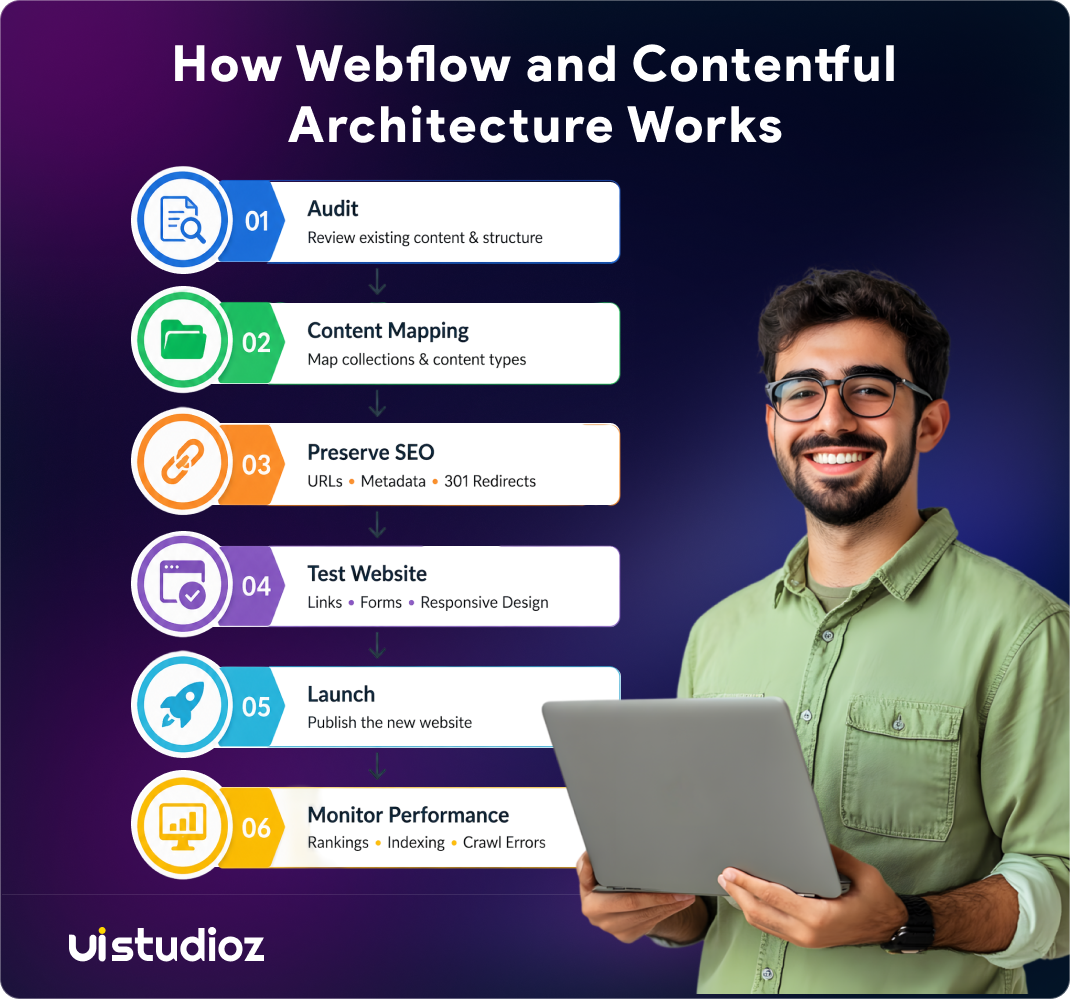
Businesses migrate from webflow to contentful when they outgrow a single-site setup and need one content source powering multiple platforms at once. Businesses migrate from contentful to webflow when the API overhead outweighs the benefit for what turns out to be a fairly straightforward marketing site.
Migration process:
- Audit the existing content structure and inventory every content type.
- Map content types from the old platform to the new platform’s model.
- Preserve SEO — carry over metadata, URLs, and redirects carefully.
- Test the new site thoroughly across devices before the switch goes live.
- Launch and monitor rankings closely for the first six weeks.
Our Webflow migration services handle this end-to-end, including the redirect mapping step most teams get wrong on their first attempt without help.
Post-migration checklist: verify every URL resolves correctly, confirm redirects fire as expected, check that metadata carried over cleanly, and monitor search rankings weekly for the first month after launch.
Real-World Examples of Webflow and Contentful Usage
Webflow shows up most often on startup marketing sites, agency portfolios, and SaaS landing pages, where publishing speed matters more than channel complexity. Marketing teams at these companies typically own the entire site without waiting on a developer for routine changes.
Contentful shows up on enterprise platforms feeding content to a website, a mobile app, and internal tools from one shared source. These are usually organizations with dedicated engineering teams who treat the frontend as its own product, separate from the content strategy behind it.
Webflow vs Contentful: Pros and Cons
Webflow
Pros: visual editing, fast publishing, SEO-friendly setup by default, low developer dependency.
Cons: limited support for very complex content structures, less backend flexibility for custom logic.
Contentful
Pros: highly scalable, flexible APIs, strong multi-channel publishing support.
Cons: requires developers for nearly everything, higher technical complexity overall.
Webflow vs Contentful: Which CMS Should You Choose?
| Choose Webflow If | Choose Contentful If |
| Marketing website | Enterprise platform |
| Fast updates required | Multiple digital channels |
| Designers manage content | Developer team available |
| SEO-focused website | Advanced API requirements |
Conclusion
Webflow and Contentful solve different problems, not the same problem better or worse than each other. That distinction matters more than most comparison articles admit, because the real question isn’t “which CMS is superior” — it’s “which CMS matches how your team actually works.”
Webflow wins for marketing teams that want design control and fast publishing without a developer queue slowing every update down. If your team is small, your site is primarily a marketing or SaaS presence, and your priority is shipping pages quickly without filing engineering tickets, Webflow removes that friction entirely. Contentful wins for enterprises that need one content source feeding multiple platforms at real scale — a website, an app, and a partner portal all pulling from the same structured content, maintained by a dedicated development team that treats the frontend as its own product.
The right call ultimately depends on three things: your team’s technical resources, how many channels your content needs to reach today, and how much that’s likely to change over the next two to three years. Choosing based on where you are now, rather than where you might be someday, avoids the most common mistake teams make in this decision – paying for headless complexity you don’t need yet, or outgrowing a visual CMS sooner than expected. If you’re still weighing the decision, contact us and we’ll map it against your specific setup, team, and growth plans.

Frequently Asked Questions
1. What is the difference between Webflow and Contentful?
Webflow bundles design, content, and hosting in one platform. Contentful is headless — it stores content and delivers it through an API to a frontend you build separately.
2. Is Webflow better than Contentful for SEO?
For most marketing sites, yes. Webflow’s built-in SEO tools work without any developer setup. A well-built Contentful frontend can match it, but only with significant extra effort.
3. Is Contentful a headless CMS?
Yes. Contentful stores structured content and delivers it via API, with no built-in frontend or hosting layer included.
4. Should startups use Webflow or Contentful?
Most startups do better with Webflow. It offers a faster launch, lower cost, and no developer bottleneck for daily content updates.
5. Can Webflow and Contentful work together?
Not directly, but some teams run Webflow for the marketing site and Contentful separately for an app or a dedicated content hub.
6. Which CMS is better for SaaS websites?
Webflow works well for the marketing site and blog. Contentful makes more sense once the product itself needs a shared content layer across platforms.
7. How long does it take to learn Webflow and Contentful?
Webflow’s visual editor takes a few days to learn comfortably. Contentful’s API-first setup takes much longer and usually needs developer involvement from day one.